
VP Foundation
- Lesson6 of 6
- Time60 min
Previs, techvis, postvis and the roles
Outcome
Tell previs, techvis and postvis apart, describe the VP supervisor's role, and choose the role you're aiming for with the evidence for it.
Mapped to 2 ScreenSkills checklist lines
- ScreenSkills virtual production competencies: VFX creation (virtual art department) roles · Render visual effects: "provide information to others on render times and any likely bottlenecks or conflicting priorities"
- ScreenSkills virtual production competencies: VFX creation (virtual art department) roles · Create animation rigs: "ensure rigs have a version that can be used for real-time feedback"
ScreenSkills checklists are guides, not accreditation. This course is not endorsed by ScreenSkills.
Watch
3 films · about 64 minutes
Your browser blocked the player's tracking script, so watch time can't be credited here. Use the demo skip below.
More like this: Virtual production path
Films are made and owned by the channels named, and play from YouTube. Inclusion here is not an endorsement either way.
Three kinds of 'vis'
- Previs: plans the shots in 3D before the shoot: framing, lens, movement and timing.
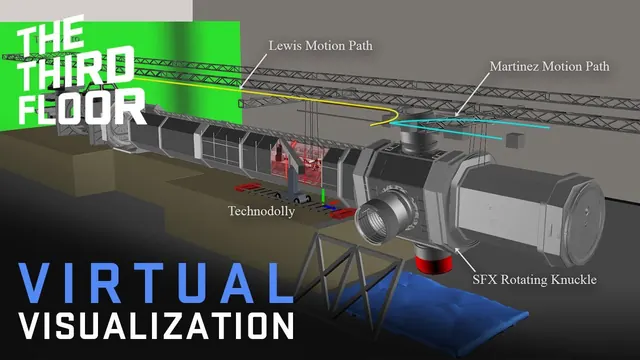
- Techvis: works out how to shoot it: camera positions, crane reach, track length, the size of the wall needed.
- Postvis: rough effects put into shots after the shoot, so the edit can be judged before final VFX.
The VP supervisor
- The creative and technical lead for VP across prep, stage and post. The DoP, designer and VFX supervisor work through them.
- They decide with HoDs which scenes go on the volume, lead the VAD and tech checks, run the brain bar on the day, and hand over to post.
Next: your competency check
- Choose the VP role you're aiming for, and gather your evidence: your tasks from this course, anything you've made, and what you already do well. Bring it to the check if you like; it helps, but isn't required.
- Book a short competency check with us, online or in person. Then a practical on our unit. The FIF Certificate comes only from the practical.
Check
3 questions drawn from 8 · pass mark 80% · safety-critical questions must be right · 3 attempts in 24 hours · new questions each time
Watch the films to open the check.
Do
Your target role and evidence · 25 minutes
Name the VP role you're aiming for, why it suits you, and the evidence you'll bring to your competency check.
How it's marked
- A real VP role
- Reasons link to real strengths
- Evidence includes at least three course tasks
- Honest about gaps and how to fill them
Met or Not yet, with a comment from a trained reviewer. Until accounts open, open the model answer after you submit and mark your own work against it.
Model answer (open after you submit)
Example: 'Real-time operator. I've used Blender and Unreal for two years and I'm quick under pressure. Evidence: my previs (lesson 5), my moiré answer (lesson 3), my lighting plan (lesson 4), and a short Unreal scene I made. Gap: I haven't worked on a live set: I'd like the practical to cover the brain bar.'
Reflect
Record
This is everything kept about this lesson. In the pilot it's held by Futures in Film CIC in your account; Screen Sisters CIC sees named records only if you agree. Your data
Moving on doesn't complete a lesson. A lesson is complete when the films are watched, the check is passed and the task is marked Met.